Optimizing for the Right User

A good friend of mine (who is an amazing entrepreneur) called me last night and was excited to tell me that he got a huge burst in traffic and acquired 10,000 new users in the last 2 months for his website. The reason for the burst was he was investing in social media advertising, running contests, SEO, referrals, etc.

This is really great! Acquiring 10,000 new users is a major accomplishment, especially in such a short time period. Also – free users can help you build and test your product. It also helps you validate the market.

BUT, here is the problem:
I asked him what is his goal was. It was to acquire paying customers for his product. In my opinion most of these 10,000 new users will never ever convert to paid customers. The problem with focusing on free users out of the gate is this is the wrong type of customer – you know, the customers that never pay you.

Once you have a product try charging as soon as possible. Have a very generous free plan but also have a paid plan. You don’t really have customers until you have someone paying you. This will also help you optimize your web business towards bringing more money in the door.

Are we just getting better at getting free customers?

I’ve run into this issue as well. For my side product, Digioh – we have several hundred users that we acquired through Google Adwords on specific keywords. We got really excited for about a week until we realized that we still only have a handful a paying customers. We asked ourselves: Are we just getting better acquiring free customers because we want to get better at building a business where people pay for our services.

Since we have a premium paid plan in place, we are focusing on ways to optimize our site to get people to pay us. This includes changing our landing pages, re-writing our ad copy, and really understanding what features customers will pay for.

Easy To Cancel makes it Easier to Sign Up

Don’t you just hate it when you have to mail in a letter or call a phone number to cancel your “Free Trial”? Chances are your potential customers do too.

The only way to combat this notion is to tell your customers how easy it is to cancel your service right when you ask for their Credit Card information.

This comment on Hacker News blew my mind:

“The reason I think long and hard before signing up for new web services isn’t even the cost 99% of the time, but the uncertainty in how difficult it is going to be to cancel should I decide I do not want to continue.” George McBay

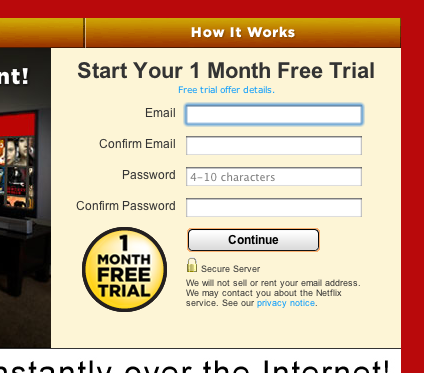
Checkout what Netflix does to combat this:

Step 1: They don’t show the credit card form. They just want to grab your email address so they can send you marketing emails in case you don’t sign up on the 2nd step.

(click on image for a bigger image)

Step 2: Make it very obvious that your customer can cancel online anytime easily. {tweet}

Do you know other ways to combat the “It Sucks To Cancel” notion? Let me know in the comments.

Sales Copy Hack

Change your sales copy based on what your customers are saying.

Yesterday a customer asked if we had a “Virtual Vault” – a way to protect her digital files that she is selling. Technically we do, but we just didn’t explain it to her in ways she would understand. 6 simple words “Virtual Vault – Secure Digital File Protection” makes way more sense than our paragraph explaining our security features.

Your Customer is Always Right

I’ve heard the phrase “Your Customers is Always Right” over and over again. I thought I understood what that phrase meant. You know… give the customer what they want, but it wasn’t until last week that I actually conceptualized it. This is my short story on my realization.

At Flying Cart we decided to launch features based on repeat customer support questions. If we keep getting the same questions we aren’t doing our job well, we need to make our product work the way our customers think it’s going to work.

Make Your Product Work How Your Customers Think It Should Work {tweet}

Here are two changes we made:

1. If the customer upgrades while on their free trial – they remain on the free trial. Before, customers would get charged the full price when they upgraded.

2. Only authorize the customers credit card for $0. Previously we were authorizing the credit card for the full amount of the package ($9.99/mo) – this led a $9.99 authorize being displayed on the customers credit card and in most cases it looked like a charge (not an authorization). This led to tons of customer phone calls and emails asking why they were charged.

It Is All About What They Want, Not What You Want

The way to make sure that the customer always wins is to find the win-win scenario.  I resisted the change because it seemed like lost revenue, but I needed to test that.  In fact, since launching this feature we have seen an increase in upgrades and a reduction in customer support emails – everyone wins!  If I hadn’t have been willing to test what customers were telling me, I would have be missing out on upgrades, and they wouldn’t be as happy.

Here is why I think we have seen an increase in upgrades. Our sweet sales copy:
“Upgrade Today for Free and enjoy all the features now! – You won’t be charged your new rate for another 3 weeks!”

Do you have a great story about “The Customer is Always Right”. Please, let me know in the comments – I’d love to include it in an updated version of this post (full credit will be given).

3-5 years

Starting at the day you first come up with your business idea to the day you start making real money will probably take 3-5 years.

Getting your team together, understanding where customers live, and building your customers dream product takes time. Since you know this you shouldn’t immediately pivot (change your idea) because you’re not making money. Make sure you have at least reached out to 50 potential customers before making any assessments on wether your business idea is a good one or not.

Pivoting is not reasonable unless you have disproven your initial assumptions. {tweet}

Only Pivot If It Brings You More Customers

I’m all for pivoting when you learn that your customers are willing to buy X and you are currently selling Y. However, since open source frameworks make it so easy to completely scrap your web product and start from scratch every 3 months I see a lot of people “pivoting” with a brand new idea quickly.

The problem with working on new ideas is you will never become an expert in your market. You will only learn how to dominate a market after years of market research and product development for a specific type of customer.

If you give your business 3-5 years here is what you will uncover:
1. How your customers think
2. What your customers actually need
3. Where your customers live
4. How to reach your customers
5. How to charge your customers the amount they are willing to pay

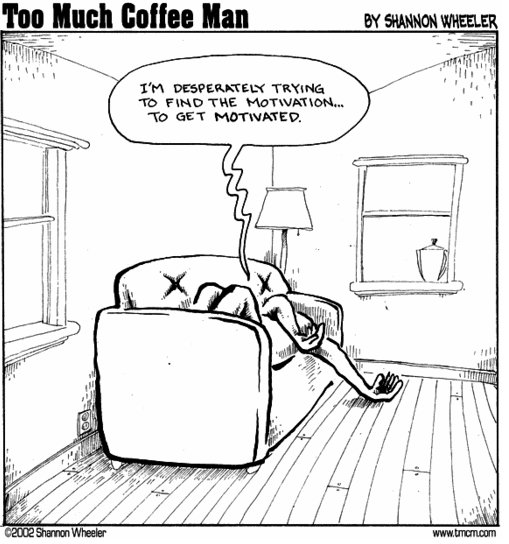
Motivation Is All You Have

Changing your idea in 3 month cycles will completely drain you, your team, and will completely kill any vision you had. Having a vision for a business is a precious thing. They only come every few decades.. and that is if you’re lucky. Don’t ever lose your vision. Once you have it hold on to it as long as you can. Don’t let anyone convince you to do anything else not even investors, friends, or family members. A vision helps you stay motivated and motivation is all you have when you are starting a business.

The Best Businesses Teach

I had the opportunity to write a sweet guest blog post on the amazing Kissmetrics blog. I go into detail on how to build a trustworthy brand over the internet by teaching your customers. This blog post is very detailed going over examples of how top internet brands teach and tactics they use to grow their customer base. Check out the post here.

Getting Paying Customers is YOUR problem

You can’t expect your users to stumble upon paying you. Sending your users email reminders and navigating them through a series of steps that will lead them to paying you is key.

One of my favorite freemium website builders, Weebly, does an incredible job. Here is what they do:

Step 1: Get the Users Email Address

Weebly Homepage

Weebly tries to get you into an account as fast as possible. The free sign up form is right on the homepage, they don’t focus on making you watch the video or go to a “Pricing Page”.

Step 2: Create an Easy Hook to Get the User Engaged

Weebly's Welcome Message

Notice the stripped out navigation. Weebly only gives the user two options right after you create an account.

Option 1: Fill out your website title and the type of site you are  building

Option 2: Close the browser

The “Category” question is really interesting. This probably helps Weebly understand who their top customers are and helps them target future customers as well. Another side benefit is Weebly can tailor the user experience based on what category the customer selects.

Step 3: First Sell – Get Your Users to Buy a Domain

Step 3 Weebly Choose Website Domain

If you purchase your domain with Weebly it is a major lock in factor. People hardly ever get rid of the domains they buy. I like how they make this part of their on boarding process and the default option checks to see if you domain is available.

Step 4: Send Timed Emails to Remind Them of Your Service

Step 4 - Weebly  - Timed Reminder 1

Checkout how they use my name in the subject line and in the email. Open rates go dramatically up when you include the first name or business name of your customers.

I also really like the “Auto Log-in to Weebly” in the upper right hand corner. I never remember my password and a major barrier to entry for me would be having to go through resetting my password. The “Auto Log-in” removes that worry from my completely.

Step 5: Send a Hard Close Email with a Coupon to get Users to Upgrade

They end the email with a sense of urgency. They really make you feel like you are losing out if you don’t upgrade today. You only get this email if you haven’t upgraded.

When in doubt – Think Like Ikea

Ikea Store Map

Have you ever been to Ikea? If not, there is only one route you can take through the entire store. They make it super simple to buy everything you need. Don’t worry if you forgot something on your list, Ikea will remind you by showing you on your path to the checkout aisle. This worked on me about 2 years ago when I moved to San Francisco. I thought all I needed was a bed, some dishes, and a couch…. Ikea really opened my eyes by showing me all the things that I was missing on my list.

Do you know other companies that have amazing navigation that lead to paying customers? Let me know about them in the comments below.

Hulu is Inventing the Future of TV Ads

It’s pretty interesting how Hulu prompts the user to pick their TV Ad preferences. They give you the option of picking between three ads to watch (see above image).

Hulu.com has a major advantage here. They can provide in depth Analytics on what type of commericals viewers want to see. They can study which one people like to pick and which one they actually see. They can also tie this data into what types of shows you watch, your gender, etc. if you are logged in. This is pretty incredible for two main reasons:

1) Test Bed: Companies can now see which commercials perform better with real time data.

They can use advertising on Hulu as a test bed before rolling out ads on TV. (Currently the demographics of viewers on Hulu and regular TV are different but the gap will narrow over the next 10 years)

2) Grow Sales: Companies can see which ads convert into sales or brand engagement.

Did you know that Paid Search Advertising is almost as big as TV Advertising? Paid Search Advertising will will easily surpass TV Advertising over the next few years. The reason why is due to the fact that people can track and see if advertising actually works. Once a company can see that advertising is working it is easy to rationalize putting every dime you have into it.

So how can Hulu invent the future of TV Ads?

Just like how Google and Facebook customize your experience based on things you have clicked on. Hulu can tailor your experience on what ads you see. If they know you like sci-fi TV shows they can shows ads of other sci-fi TV shows you would like. Once they convert you into someone watching more TV shows they can start learning about your interests and showing you ads based on things you said you like. A simple question like the image above is really all they need to ask you. Before you know it Hulu will be able to show you what you need to buy before you know it!

Hulu is sitting on a major gold mine (just like Google)

1. They can get you watching more TV (by learning more about you)

2. They can get brands to pay a premium to learn what ads work… and when they do charge more for it

Do you think Hulu is the future of TV? Do you think Netflix should try a free approach with their new streaming only plan and inject ads like Hulu? Please let me know in the comments.

Get Forms Signed Quickly

Signing application forms can be a daunting task. Knowing where to sign and what to write always seems confusing to me. That is why the best thing to do for people like me is offer a filled out example of what the legal doc should look like after you sign it.

I can’t take credit for this idea. I saw BrainTree do this and it got me to sign the papers quickly.

Screenshot of how to get people to sign legal docs

The #1 Way to Get A Reply Back: Follow Ups

I rely on a system of followups to get a yes or no from potential customers. I send about 5 cold emails to prospective customers and 5 warm emails to existing customers (the ones on my free plan) everyday. I like to find out how we can help businesses with our products.

People Fail. Systems Don’t.

People are busy. Their Inbox is overloaded. It is my job to remind them that I still exist and can help their business. That is why I created a simple system that reminds me to followup with potential customers 3 times over a 6 week period.

My Easy To Use FollowUp System

My system can easily be replicated if you want to use it. I use a free service called FollowUpThen.

Screen Shot of The FollowUpThen Setup

All You Need to Do is Add FollowUpThen to the BCC field

1. 1st Contact Email, BCC “2days@followupthen.com”
(FollowUpThen sends me a reminder in 2 days)

2. 1st Follow Up Email, BCC “nextweek@followupthen.com”
(FollowUpThen sends me a reminder in 1 week)

3. 2nd Follow Up Email, BCC “next month@followupthen.com”
(FollowUpThen sends me a reminder in 1 month)

I use GMail, which uses conversation mode, so each followupthen reminder is sent in the same thread. Making it super easy to find the email you need to follow up with!

Customers very rarely email me back on the first email. Almost always I get a reply to the 1st follow up.

Reminder Emails Are In The Same Sent Thread for Easy Access

Reminder Emails Are In The Same Sent Thread for Easy Access

Download my easy to use Follow Up Email Templates for free here. I have 3 follow up email templates that you can use for job interviews, small internet sales, and big sales. All 3 follow up email templates are the ones I follow on a daily basis.